


Free Fire: 9th Anniversary
4.3653.32K Reviews
App Specs
- Version
- 1.128.2
- Updated On
- License
- Free
- Downloads
- 1,000,000,000+
- Developer
- GARENA INTERNATIONAL I
- Categories
- Action
- Platform
- Android, iOS
Screenshots

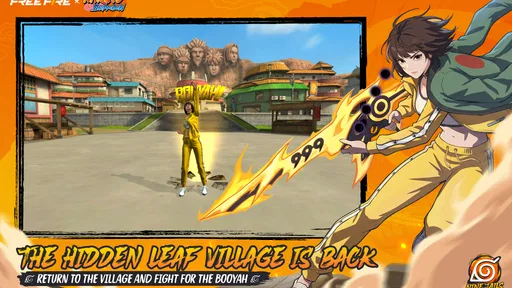
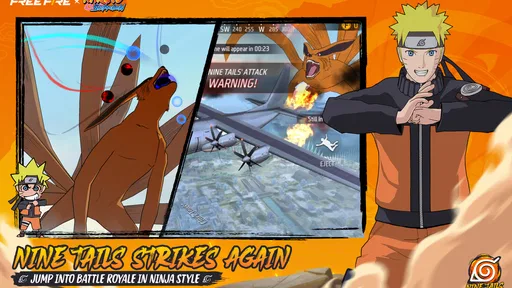
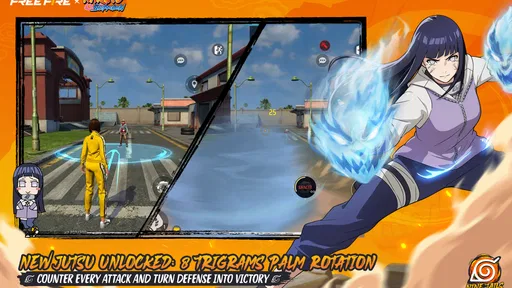
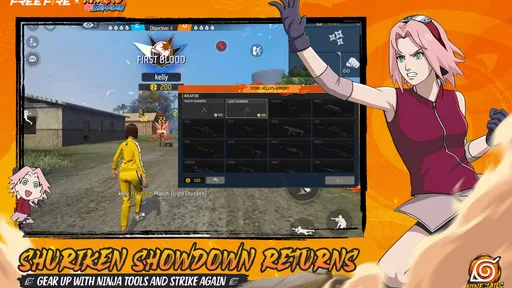
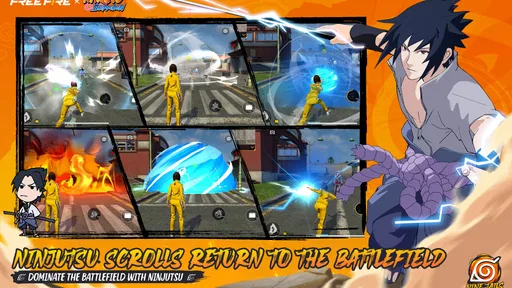
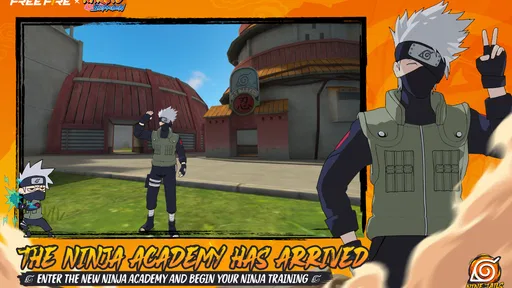
 Analysis by AppCompare
When I judge a mobile battle royale, I look beyond the first exciting firefight: can I read what is happening, steer comfortably, and fit a match into a real day? Free Fire: Winterlands makes a strong case for players who want short, direct action, but its fast pace also asks a lot from your attention and hands. I found the winter setting appealing, though the most useful question is whether its interface and play style suit you, not just whether the scenery looks good.
Readable in a hurry, with a busy battlefield
Garena International I makes this free action game, whose short-match format is easy to understand: land, make decisions, stay inside the safe area, and try to outlast the other players. The store summary describes a ten-minute survival shooter, and that promise is a good guide to its rhythm. You do not need to set aside an evening to see whether you enjoy a round. Its 4.3 average from around 126 million ratings and more than a billion installs also show how widely it has found an audience, though popularity alone cannot tell you whether its controls will feel right on your phone.
The compact battle royale format is a readability trade-off. Encounters arrive quickly, so the point of a match is rarely obscure; at the same time, a crowded screen can demand that I track movement, combat cues, the safe zone, and my own position at once. I recommend taking a few low-pressure rounds to learn where the interface places its important information before treating every match as a serious test. That small adjustment can make the opening feel less like a rush of unfamiliar signals.
Guides and Analysis on Free Fire: 9th Anniversary
The winter look gives the battlefield a distinct visual mood, but seasonal decoration is not the same thing as clearer navigation. Snowy scenery can make a match feel different from a plain training space, while movement and combat remain the main demands. If you rely on strong visual contrast to pick out small details, try the game on the actual device you plan to use and see whether you can comfortably distinguish the action. I would not assume that a theme automatically improves visibility for every player.
Touch controls, sound, and different ways of playing
The controls are designed for touch, which makes the basic idea accessible to anyone used to moving a character with one thumb and responding with the other. But “easy to get the hang of” is not the same as effortless for every hand. A fast shooter asks for repeated taps and quick changes of direction, and a small screen can make those movements feel cramped. I would test a short session before committing to long play, especially if you have limited finger mobility, hand fatigue, or difficulty holding a phone steady.
Audio cues can help you notice gunfire and activity outside your immediate view, so playing with sound may give you information that the picture alone does not. That is useful if you can comfortably listen, but it also means a quiet setting, muted device, or hearing difficulty can change how much you pick up. I would treat sound as helpful context rather than a substitute for watching the screen. If you play in a shared room or on a commute, keep the volume considerate and do not rely on audio alone to make decisions.
There is a practical way to reduce the sensory load: begin by learning one task at a time. In an early match, concentrate on moving safely and recognizing the boundary of the playable area; in another, focus on how you respond when a fight starts. Trying to master positioning, aiming, equipment choices, and character abilities all at once can make the interface feel harder than it is. This is not a promise that the game has a special accessibility mode; it is simply a gentler way to learn its pace.
Worth Reading Before You Choose

Switching to Android Auto Means Rethinking Your Driving Routine

Google Calendar Makes a Crowded Week Easier to Manage

Baby Panda World Brings Quick Play to Modern Phones, but Its Game Library Feels Busy

ESPN’s Live Game View Makes Following Close Games Easier

QuizzLand Review: A Good Fit for Short Trivia Breaks, Not Every Player

Basketball Stars: Multiplayer Is Fast, but Can It Recover When Matches Go Wrong?
Where it fits into an ordinary day
A short match can work well when I have a brief break and want an active game rather than a long story mission. For example, if I have a little time between errands, I can play a round and stop when it ends instead of worrying about finding a save point. The trade-off is that the advertised match length is not the entire session: opening the game, choosing what to do, and getting ready for another round can add time. I would avoid starting just before a meeting or while travelling somewhere that needs my attention.
For someone new to mobile shooters, the compact rounds make experimentation less costly than a battle royale that keeps you invested in a single long match. You can try a cautious approach, then a more aggressive one, and notice which feels manageable. If you are playing with friends, the game can provide a shared activity that does not require a lengthy appointment. If you prefer calm, solo play with no pressure to react quickly, however, a puzzle game or a slower single-player action title may suit you better.
Compared with many mobile action games, this one puts the focus on competing against other players and surviving a changing match, rather than progressing through a sequence of story stages. That gives each round uncertainty and replay value, but it also means opponents set the pace. A player who wants predictable objectives, a relaxed exploration game, or a campaign that can be paused at any moment may find a conventional action adventure more comfortable. I see Free Fire as a better fit for short bursts of competitive focus than for winding down without interruption.
Making character choices work for you
The character abilities add a decision before the match: choose a style that complements how you actually play, rather than picking only by appearance. If you tend to keep moving, an ability suited to that approach may feel more natural than one that rewards a different habit. I would change one choice at a time and pay attention to what it lets you do in a real encounter. That makes it easier to tell whether an ability is helping, instead of changing several things and guessing why a round went better or worse.
A useful early routine is to treat the first moments of a match as information gathering. Notice the route you take, where you feel exposed, and whether you can read your surroundings while moving. If you are often surprised from behind, try spending less time focused on a single direction and more time checking the wider scene. If you lose fights because you rush into them, use the next round to slow down and choose your approach. Those small experiments are more informative than copying a high-risk style before you understand the controls.
The shrinking safe area is another reason to think ahead rather than chase every sound. A fight may be tempting, but leaving yourself with little time to move can turn a win into a bad position. I try to balance curiosity with a simple question: will this detour leave me able to reach safety? That habit is specific to the match’s changing space and helps new players make decisions without needing to memorize every possible encounter.
Gameplay and Features
First off, let’s talk gameplay. Free Fire: Winterlands dumps you into a 10-minute match where you’re up against 49 other players. The goal? Be the last one standing. Sounds straightforward, right? Well, it’s anything but. The game’s compact map ensures that you’re always in the thick of the action, and the shrinking safe zone keeps you on your toes.
One of the standout features is the character system. You can choose from a variety of characters, each with unique abilities that can give you an edge in battle. Whether you want to be stealthy, speedy, or a bit of a tank, there’s a character for you. Plus, the winter theme adds a fresh twist to the usual battle royale vibe, with snow-covered landscapes and festive gear to deck your character out in style.
Graphics and Sound
The graphics in Free Fire: Winterlands are pretty impressive, especially for a mobile game. The winter setting is beautifully rendered, with crisp, clear visuals that make you feel like you’re really there, braving the cold and the competition. The sound design complements the visuals perfectly, with immersive audio cues that help you keep track of enemy movements and gunfire.
Controls and User Experience
Controlling your character is a breeze, thanks to intuitive touch controls that are easy to get the hang of. Even if you’re new to mobile shooters, you’ll find yourself navigating the battlefield with confidence in no time. The user interface is clean and straightforward, making it easy to dive into a match or customize your character without getting bogged down by menus.
Those impressions are most likely to hold for someone who is comfortable with quick touchscreen actions and a visually active screen. If you find the interface too small or the combat too demanding, that is a meaningful limitation, not a personal failure. I would try playing while seated with the phone held securely, rather than testing it while walking or juggling other tasks. A stable posture makes it easier to focus and gives your hands a fair chance to learn the controls.
Free to start, with choices to weigh
The game is free to download, with in-app purchases priced from nine cents to just under one hundred dollars per item. That range makes it worth checking each purchase carefully rather than assuming that every option is a small add-on. You can start without paying, but free-to-play games can present spending choices as you go. I recommend setting a personal spending limit in advance, especially if the game is for a younger player, and treating optional purchases as separate from whether the core match format is enjoyable.
It is rated Teen, so parents should consider whether competitive shooting and the online nature of a battle royale fit their household’s expectations. A child may also need help understanding that optional purchases use real money and that a short match can lead to the urge to play another. Clear rules about session time and spending are more useful than relying on a rating alone. For adults, the same advice applies if you would rather keep a free game from turning into an unplanned expense.
The current version is 1.118.1, and the game requires Android 5.0 or later. That requirement is a practical starting point, not a guarantee that every compatible device will feel equally smooth or comfortable. Before a long session, check that the game runs well on your own phone and that the display is easy for you to read. If performance or cramped controls make aiming frustrating, a larger screen may help; if your device still struggles, choosing a less demanding game is a sensible alternative.
When I would choose something else
I would skip this one if I wanted a quiet game that can be played without reacting to other people, or if I strongly dislike losing progress in a round after a mistake. Battle royale tension is the appeal for some players and the source of friction for others. The changing safe area and the prospect of being eliminated reward quick adjustment, so someone who needs frequent pauses may find the flow awkward. It is also not the best choice when I need to keep my attention on a conversation, navigation, or a task around me.
It may also be a poor fit for players who prefer careful, long-form tactics over immediate action. A more deliberate strategy game gives you time to inspect options; a solo campaign lets you set the pace and follow a story. Free Fire’s shorter format is convenient, but it does not remove the pressure of real-time competition. I would choose it for energetic rounds, not for a reliably restful experience.
If you do decide to try it, keep the first session simple: learn the movement, see how the safe area affects your route, and notice whether visual and audio cues are comfortable for you. Then try a character ability that matches your natural approach rather than chasing a supposed perfect setup. This gives you useful answers to the questions most new players have: whether the controls suit their hands, whether the pace is enjoyable, and whether the game fits their available time.
Why You Should Try It
So, why should you give Free Fire: Winterlands a shot? Well, if you’re a fan of fast-paced, strategic gameplay with a side of adrenaline, this game’s got your name written all over it. The winter theme adds a unique twist, and the character abilities let you tailor your playstyle to suit your strengths. Plus, it’s free to play, so there’s really no reason not to jump in and see what all the fuss is about.
For me, the strongest reason to try it is the combination of short rounds and meaningful choices about how to approach each one. The same qualities also explain why it will not suit everyone: fast competition, touch controls, and a busy screen can become tiring if you want a gentler pace. I would start with a couple of rounds, take a break, and decide based on how the actual play feels rather than on the winter presentation alone.
All in all, Free Fire: Winterlands delivers an exhilarating battle royale experience that’s perfect for quick gaming sessions or longer playthroughs. Whether you’re a seasoned veteran of the genre or just looking for something new to try, this game is definitely worth a download.
My recommendation is therefore specific: give it a try if you enjoy mobile competition, can comfortably follow quick visual changes, and want matches that fit into a short break. If you need calmer pacing, more pause-friendly play, or a screen that is less demanding, another kind of action game will probably be a better match. That balance is what makes this a worthwhile option for the right player rather than an automatic recommendation for everyone.
Pros
- Intense gameplay with quick matches.
- Diverse character customization options.
- Regular updates with new content.
- Smooth controls for mobile devices.
- Engaging team dynamics and strategies.
Cons
- In-app purchases can be costly.
- Occasional server lag issues.
- Graphics may seem basic to some.
- Limited map variety over time.
- Battery drain is significant.
FAQs for Free Fire: 9th Anniversary
What is Free Fire: Winterlands and how does it differ from the regular Free Fire game?
Free Fire: Winterlands is a special seasonal version of the popular battle royale game, Free Fire. It features unique winter-themed events, exclusive skins, and festive game modes not available in the standard version. This seasonal update enhances gameplay with a fresh, holiday-inspired atmosphere and limited-time rewards.
What are the system requirements for Free Fire: Winterlands?
Free Fire: Winterlands is designed to run on both Android and iOS devices. For Android, it requires at least 2GB of RAM and Android 4.0.3 or higher. For iOS users, the game requires an iPhone 6S or newer with iOS 9.0 or later. Make sure your device meets these requirements for optimal performance.
Are there any in-game purchases in Free Fire: Winterlands?
Yes, Free Fire: Winterlands offers various in-game purchases. Players can buy diamonds, the premium currency, to acquire exclusive skins, characters, and other items. There are also special seasonal bundles and offers available. While purchases can enhance your gaming experience, they are entirely optional and not necessary to enjoy the game.
Can I play Free Fire: Winterlands with friends?
Absolutely! Free Fire: Winterlands supports multiplayer modes, allowing you to team up with friends. You can create a squad or duo team to compete against other players globally. The game also includes voice chat features to help you communicate effectively with your teammates during matches.
How often are updates and new content released for Free Fire: Winterlands?
Free Fire: Winterlands receives regular updates to keep the game fresh and exciting. These updates often include new events, skins, and game modes. The developers are committed to providing a dynamic experience, especially during the holiday season, ensuring players have new content to explore regularly.


